newbie here, so please be kind. I tried googling and searching here for an answer but I think I just don't know correct terms to use.
I am trying to model a ghost for a game. I have a frame (UV sphere extruded down) and a plane with cloth modifier that I drape over it. When I run the cloth simulation, I eventually get the ghost shape that I want. Now, I want to add some actions for it. How do I "pause" it at the ghost shape that I want and start making animations for it, like Idle (I want the cloth to swing around a bit, like the ghost is swinging its hips) and Walk (I want the cloth to flow back like it's walking). I hope that made sense.
Thanks!

 Go to the frame you want and make sure the cloth settings are perfect. This change will be permanent.
  Go to your modifiers panel and click Apply.
 This will convert it from a dynamic modifier into an editable mesh.
 Start by adding a bone to your ghost.
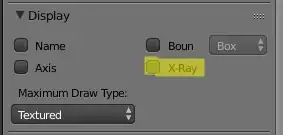 Enable X-ray so you can see what you're doing
 Making sure your bone is positioned at the top of the ghost hit
  Back in object mode select your ghost, hold down
  Finally animate the ghost how you like it to look.
 Not bad for simple it was to create. More bones gives you more control obviously.
