2

I'm a newbie user and I'm trying to render an image on 2.81 and 2.81a but the render window keeps popping up with the last frame of recent render.

I can tell the computer is rendering due to the processor load, but I can't see any result anywhere.

Any setting or preferences I accidentally touched?

  • In order to increase the chance of a meaningful response, could you please modify your title to better describe the specific problem you're having. Also consider following these guidelines: https://blender.meta.stackexchange.com/questions/608/how-do-i-ask-a-question-that-is-hard-to-describe. Thanks. – Bruno Dec 26 '19 at 14:00
  • Do you have any strips on the VSE? –  Dec 26 '19 at 20:23
  • Deselecting Use Node in Compositing section worked for me – EnfantRoi52 Mar 31 '23 at 20:03

2 Answers2

1

I am also relatively new to blender but enjoying it ALOT.

As for your problem, in my opinion, this is because the particular render is sort of 'attached' to your active camera which i assume , that you used with keyframe insertions in your animation timeline. To circumvent this, I usually create a new camera and select it to be the 'active' (see below). Then F12 as usual to render from that camera.

Select the 'camera icon on the right'

aaronlhe
  • 111
  • 3
0

To view the last render, press Render in the top left-hand corner and select View Render. This can also be done by pressing F11.

If you still cannot see the render, at the top of the Blender Render window, click the small picture icon and make sure Render Result is selected.
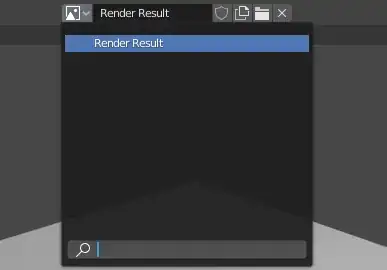
Render Result menu

Edit:

If you still don't see the proper render, check the top right corner for a drop-down menu marked with Slot.

Click on it and cycle through the different slots to check if your render is in one of the other slots.

Slot menu

Edit 2:

Found it! The problem was that you checked Sequencer by accident, so it wasn't actually rendering any images at all. I realized this when I reset the save location for the images and found all the renders were blank.

To fix the problem, head over to the Scene tab and open up Post Processing. Then, just uncheck Sequencer.

There's a great Q/A about troubleshooting blank renders here. It may be from the older UI but it still is of great help.

The problem menu

stphnl329
  • 4,817
  • 9
  • 27
  • Thanks but my problem is that I can't get rid of the last render which was an animation. Now when I look at the render window it says "Frame:27" and show the last frame of that render. I even reinstalled Blender but no luck. – Göran Thyberg Dec 26 '19 at 21:01
  • Ohhhhh ok. I'm going to update my answer, I think I know whats going on then. – stphnl329 Dec 26 '19 at 21:06
  • I should include that I no longer seems do be able to save in an updated state. When I reopen, it keeps opening as it were before the changes. I don't know if there is a connection with the render problem or a coincidence. – Göran Thyberg Dec 27 '19 at 05:47
  • Can you add your blend file to the question if you don't mind? Upload it to blend-exchange.giantcowfilms.com/ and copy/paste the generated text into the question. – stphnl329 Dec 27 '19 at 05:50
  • Sure, here it is – Göran Thyberg Dec 27 '19 at 07:24
  • Found it for reals this time! Updated the answer. I'm not sure why it isn't saving though. I can't replicate that on my end. – stphnl329 Dec 27 '19 at 14:06
  • Thanks so much, the sequencer was the problem! – Göran Thyberg Dec 28 '19 at 10:48