How are they different?
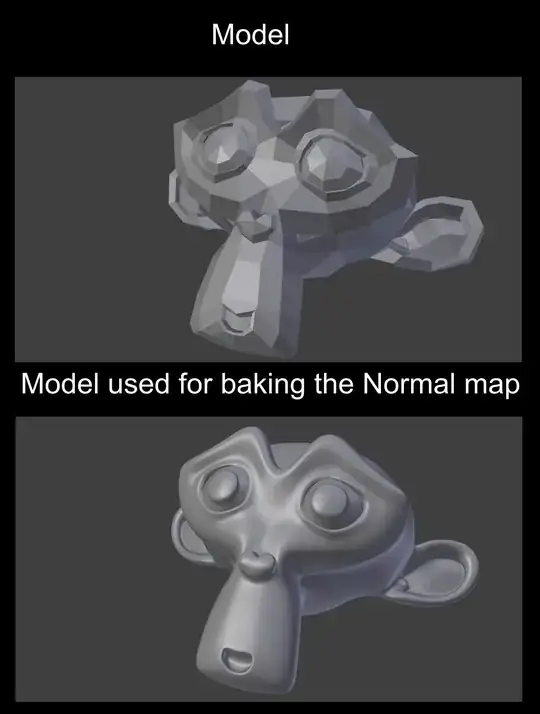

When I see these examples, I can see that in Blender Internal the map is much cleaner. It looks like another model with X Ray enabled. But, in cycles the normal map is a little messy. How is the map different from Internal and cycles and how can I get the normal map results in cycles as in Internal?
Edit: There is the file - http://www.pasteall.org/blend/29913
Note - The scene in blender internal is on the first layer and the scene for cycles in on another layer.
Here is the texture -

Unwrap the model with Smart UV Project so that it fits the normal map texture or you can bake one of your own.
Edit: Node set-up -
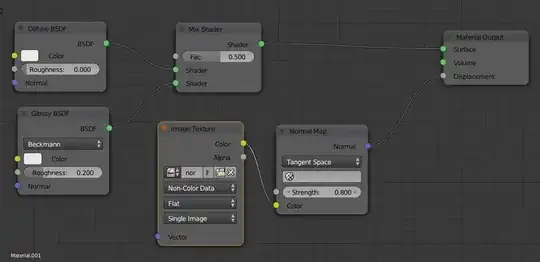
Edit: I tried user2926289's upproach but for some reason its still not as good as in blender internal. Any other ideas?
Blender Internal -
 user2926289's approach in cycles -


It was the same Unwrap and normal map texture in Internal just as in cycles. I'll make a blend file and post it here.
– Vladimir Jun 20 '14 at 21:42The ear that is closer to the camera? Yeah, I noticed that too, but I have no idea what causing that. Thanks for the answer.
– Vladimir Jun 21 '14 at 02:43