0

I'm very new with Linux and I'm trying to set up a testing network with VMs by following this video series.

I downloaded Ubuntu server 64bit version 14 and installed it using VMware workstation. I wasn't sure of many of the questions asked during the installation process but I mainly went with the defaults. Now that the machine has booted I can't login. I remember the password and name I gave to the only account I created.

What's the default account and password?
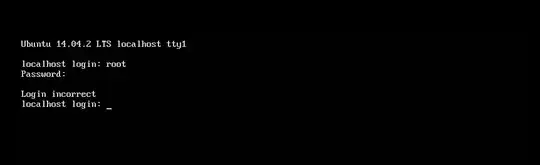
screen shot

UPDATE: somethings screwed up. I tried a new VM and noticed I'm never given the opportunity to select a password. However, in VMware it detects the installation as Ubuntu and asks me to enter my name, username and password (and I'm 100% sure the password I selected is the one I'm entering).

UPDATE 2: I tried setting the time in the .vmx to let the option screen stay longer and this is what I get
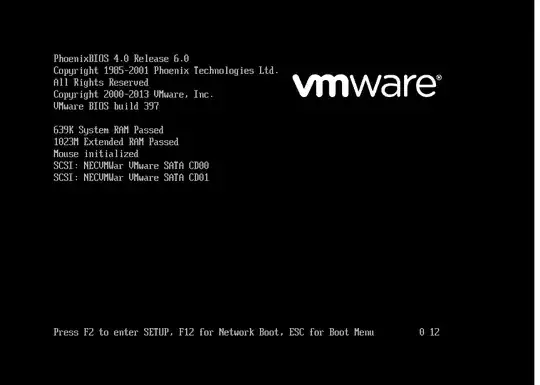
screen shot

It is possible no bootloader was installed (this is a fresh in stall so I don't mind junking it and starting from scratch).

Just to be clear this is the ISO I installed with: ubuntu-14.04.2-server-amd64

Celeritas
  • 113
  • @karel Can't reset. I try holding down shift and nothing happens, probably because it's a VM. Also I'm sure I'm typing the only password I gave it correctly. – Celeritas Apr 02 '15 at 07:54
  • I have successfully used the method in How do I reset a lost administrative password? to reset the Ubuntu administrative password in a VM running in VirtualBox by holding down the Shift key, followed by the rest of the instructions from that question. I don't know about doing it in VMware however. I agree with you that it's not a duplicate of that question because it didn't work. – karel Apr 02 '15 at 08:52

1 Answers1

2

"By default the first user's account is an administrative account, so if the UI is prompting you for a password it's probably that person's user password.If the user doesn't remember their password you need to reset it. To do this you need to boot into recovery mode." Quoted from How do I reset a lost administrative password?

Aravinda
  • 982
  • Can't reset. I try holding down shift and nothing happens, probably because it's a VM. – Celeritas Apr 02 '15 at 07:54
  • 1
    "Unfortunately, the boot screen just flies right by in Ubuntu under VMWare. So the first thing you'll need to do is shut down the VM, and then get ready to start it up. But before you start the VM: get ready to hit Shift because that's what will get you into Grub. Ready? Ok. Boot it and hit Shift." https://coderwall.com/p/vibura/reset-a-lost-password-on-an-ubuntu-vm – Aravinda Apr 02 '15 at 08:06
  • else http://askubuntu.com/questions/30858/how-to-reset-lost-user-password-on-a-guest-on-vmware-server – Aravinda Apr 02 '15 at 08:06
  • @Arvainda see my update. I increased time but there's no option to press shift to get to the indicated screen. +1 for your continuing help. – Celeritas Apr 02 '15 at 08:42
  • This is the nature of vms. It boots quickly without mouse integration.. (When rebooting it releases mouse integration to host). So while booting try Clicking mouse pointer in vm screen inside and press shift several times.. (sorry but you have to be quick clicking on vm screen while booting as well as pressing shift , may be both together!) – Aravinda Apr 02 '15 at 08:58
  • I have been pushing shift, and the modifications I made give me ~10 seconds so it's not that much of a rush. I just don't know what to do? Notice how in the screen shot it says press enter, F2, F12 or ESC but nothing about shift. – Celeritas Apr 02 '15 at 08:59
  • If you have pressed shift in timely fashion you should see this http://i62.tinypic.com/11j8204.png and the rest you have to follow this.. http://www.dailymotion.com/video/x284j4p_how-to-reset-root-password-in-ubuntu-14-04-lts_school – Aravinda Apr 02 '15 at 09:07
  • Oops I was pressing shift to soon and not waiting until AFTER the bios screen. Also with Ubuntu server 14 the instructions are a little different, you have to select "Advance options for Ubuntu" and from their select the option with the word recovery. – Celeritas Apr 02 '15 at 09:20