0

Since I have this problem which is described here. And since the only solution I have for now is to click the "Switch Account" option from the login screen in order to log into my session without getting the "Password incorrect" error then I'm looking for a way to assign a shortcut key to this option, is that possible?

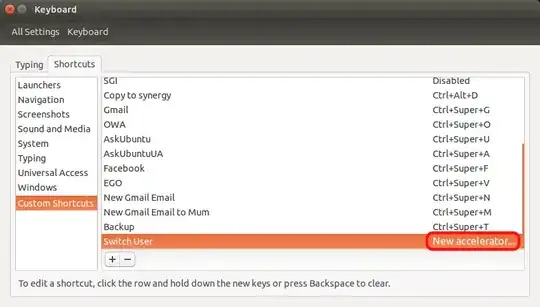
Edit #1: Once I created the keyboard shortcut, how can I assign a key mapping to it? As it says in the bottom of the window, I clicked the switch-account row but when I do a key sequence nothing happens: enter image description here

Itai Ganot
  • 193
  • 3
  • 15

1 Answers1

0

Yes.

Go to System Settings -> Keyboard -> Shortcuts -> Custom Shorcuts, then add a new one. In the "what command to be executed" line, type:

dm-tool switch-to-greeter

And then assign your chosen keypresses to it.

enter image description here

Reference

Tim
  • 32,861
  • 27
  • 118
  • 178
  • Hi Tim, thanks for your reply, please check Edit #1 in my original question. – Itai Ganot Jul 08 '14 at 12:31
  • Are you sure you are clicking on the assign keys area? (i.e. Where the Alt+Super+- is in this image: http://i.stack.imgur.com/kh7Ex.png) Also, you have to have a modifier key (or multiple), and then one normal key. – Tim Jul 08 '14 at 12:50
  • When I'm in the custom shortcut window I click the line with the new shortcut (right click or left click acts the same) I've created and it pops up the command window, and it keeps saying "Disabled" where the key sequence supposed to be, any ideas? – Itai Ganot Jul 09 '14 at 07:02
  • Yeah, left click on the word disabled. – Tim Jul 09 '14 at 08:22
  • It pops up the command window again and stays in "Disabled" – Itai Ganot Jul 09 '14 at 13:41
  • I've used Compiz (CCSM) plugin Commands to create the shortcut but it doesn't work, because while the computer is locked the key sequence doesn't work as it belongs to the session which is currently locked... it does not work outside of my user's environment – Itai Ganot Jul 09 '14 at 13:47
  • Well none of your custom shorcuts will work when in login screen as that is a security vulnerability - I could type Ctrl+Alt+T to open a termnal say... – Tim Jul 09 '14 at 13:51