I left my laptop on for a night while I was downloading some songs but when I woke up it was shutdown and when I tried to restart it I came to the login window normally.
Now when I try to login as a guest a black screen flashes with some message and I am thrown back to the login window again [even as a guest user].
When I try to go to the shell by pressing Ctrl+Alt+F1 then login.
I see this error message.
--bash: /usr/lib/command-not-found: /usr/bin/python3: bad interpreter: permission denied
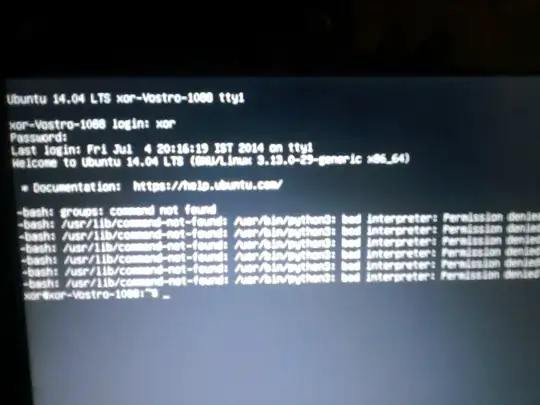
I tried to set permissions to my home directory using this command :
sudo chmod -R ug+rwx /home/xor
but it didn't helped and I saw the same error again. [as above]
I also tried this command chown xor:xor .Xauthority this time no message but problem remained unresolved.
please help me as I am very new to ubuntu as I installed it 2 weeks ago and have no idea what is happening with my system. [and sorry for bad image]


sudo apt-get install --reinstall python3. (You could pressTaba couple of times after python3 to see the latest version and install that.) – muru Jul 04 '14 at 15:26/etc/profile,.profile, etc.) causes a GUI login to fail. – muru Jul 04 '14 at 15:34.profile:. somefilewhichdoesnotexist, log out and log back in again. – muru Jul 04 '14 at 15:40lightdm/gdm/lxdmbut no help.. – xor Jul 04 '14 at 18:15--bash: /usr/lib/command-not-found: /usr/bin/python3: bad interpreter: permission deniederror again. How ever I can use commandscd,ls,cat,etc but not ones likesudo apt-get install. – xor Jul 04 '14 at 18:17ls -l /usr/bin/python3? – muru Jul 04 '14 at 18:25ls: cannot access /usr/bin/python3: permission deniedhoweverlswork else where It seems I dont have permissions over /usr/bin as I can't evencdorlsthere – xor Jul 05 '14 at 03:26ls -l /usr? If the permissions of/usr/binare bad, we can fix that usingchmod. – muru Jul 05 '14 at 11:56