1

I am using KDE and I want to:

  1. Reassign global shortcut Win+L to lock screen.
  2. Set Win+T to launch terminal.

I was able to do #1 directly changing kblobalaccel config file. But this is hack and #2 is still unsolved.

How do i do this via D-Bus or PyKDE4?

When i add Win+L via system settings, it says that this shortcut is already assigned to a Kwin action and allows me to use this shortcut anyway. So the solution should take this into account.

warvariuc
  • 2,305
  • May be You were looking for this org.kde.kglobalaccel (see d-feet) or https://api.kde.org/frameworks/kglobalaccel/html/index.html – user.dz Jul 08 '16 at 23:07

1 Answers1

1

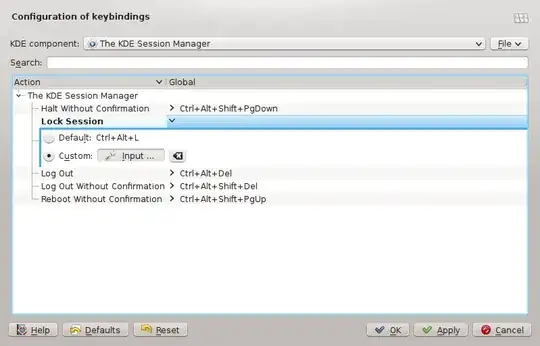
To change the lock shortcut, go to the "Global Keyboard Shortcuts" module and select "The KDE Session Manager" component, then click "Lock Session", select "Custom" and press "None". Then press the shortcut. Global Shortcuts

For #2, see this answer.

  • 1
    I will not downvote you, but you should carefully read the question. I need a programmatic way to this - using dbus or pykde4 – warvariuc Sep 23 '13 at 08:01
  • @warwaruk I saw that, but I thought you just wanted any method to get it fixed. If you want a programmatic way to do this, this question should be on stackexchange.com as it is not specific to Ubuntu/Kubuntu, but to KDE. I doubt there is a D-Bus interface for shortcuts. – Ramchandra Apte Sep 23 '13 at 09:40
  • I asked this here, but i thought also to ask on askubuntu, as i've seen some technical questions answered before. – warvariuc Sep 23 '13 at 09:59