I have a pc with only 512 mb RAM. Ubuntu Linux has installed successfully. Instead of the default Unity desktop I need to use the GNOME desktop. I have done the installation of the desktop and logged out. However, after logging in , the desktop is the Unity interface. What do I need to do to use GNOME 2 successfully. Please give a step by step solution. Thanks.
Asked
Active
Viewed 491 times
0

-
1Try the solutions for 12.04 from this answer: http://askubuntu.com/questions/58172/how-to-revert-to-gnome-classic-desktop. If you have further issues please [edit] your question to include exact steps you took, and issues you have. – Takkat Jun 14 '13 at 08:04
1 Answers
0
In the login screen, click the Ubuntu icon next to your name.

Next, select Gnome 2 as your environment. I do not have Gnome 2, but you should see it on your menu
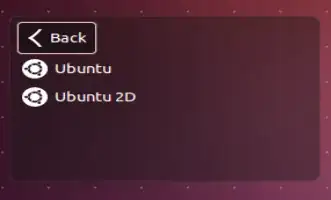
After that, Click Back, Enter your password, and that should do it.
Hope this helps.

Max Tither
- 1,364
-
Thanks for the reply. However the Ubuntu icon you have mentioned should appear, does not appear at all. All that appears is the Login name and password. Can anyone tell me why this happens. All steps given for installation of Gnome 2 on ubuntu forum have been done. – mfern Jun 17 '13 at 10:39