117

I am using Ubuntu 20.04(Gnome3.36) and need help with this:

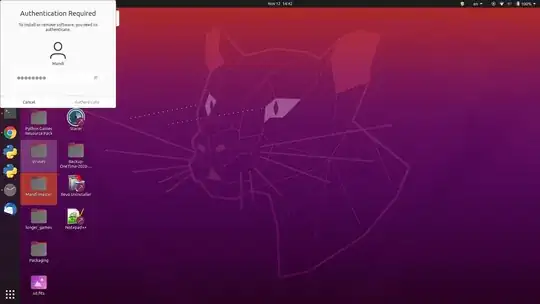
Screenshot

The Authentication Required window is stuck right after logging in and I can't close it. I tried using xkill to close the window but it didn't close, I think xkill doesn't recognize the Authentication required window as a window.

I searched for answers but only found a reddit post which the author has the same problem, which is https://www.reddit.com/r/gnome/comments/fscvql/authentication_required_window/

Is there any easier ways to remove it than rebooting?

UPDATE 2022-12-27:

On Ubuntu 22.04 I don't encounter this problem anymore, the issue seems to be fixed. But I also can't restart the gnome shell as I am now using Wayland.

MandiYang
  • 2,019
  • but on ubuntu 20.04.6 it still exists. I think I should not need to update major version to get this out – Darius.V Aug 11 '23 at 08:49

4 Answers4

190

I faced the same problem on Pop_!OS, no need to reboot actually;
The easier way is to just restart GNOME by one of two ways:

  • press Alt + F2, type r then Enter

or

  • in terminal, type killall -3 gnome-shell

This should just restart Gnome Shell. You will not lose your open windows, but you should be reminded to save all your work regularly!

Related bug: https://bugs.launchpad.net/ubuntu/+source/gnome-shell/+bug/1824874

Anan Raddad
  • 2,024
  • I used the killall command and that worked. – tnk479 Jan 02 '21 at 22:34
  • 8
    Note that this will not kill your session nor any open programs. It is non-destructive. – Paulo Neves Jan 29 '21 at 14:53
  • 1
    I was about to restart the whole computer and then I see this solution. Thank you so much. – princebillyGK Feb 04 '21 at 11:45
  • @AnanRaddad Hi, I used your method several times, but I changed gnome keyboard shortcut, and assigned Alt+F2 to something else. So I can't use Alt+F2. (a search tells me the default Alt+F2 was 'Run Console' but I can't find the menu in the keyboard shortcut edit window) Please help me.. what can I do in this case? – Chan Kim May 25 '21 at 05:40
  • Hi, all, I found I've changed the keyboard shortcut 'alt+F2' to 'alt+F8' and can now do the same with 'alt+F8'. So in case different shortcut is set, the shortcut function name was 'show the run command prompt'. – Chan Kim May 26 '21 at 00:39
  • Much Appreciated! This became a lifesaver – nabeel Jul 08 '21 at 05:26
  • This worked perfectly for me as well, thanks! – davidawad Sep 08 '21 at 15:31
  • 1
    For me, this kills emacs windows on ubuntu 20.04. – Ryogi Oct 18 '21 at 17:49
  • The most upvoted answer is emphatically not helpful. It may have 127 upvotes, but killall -3 gnome-shell blacked out my screen; and after a few presses of the 'power' button to get my MBP back to life, I was left with HDD corruption & inconsistencies requiring manual fsck. Luckily nothing in 'lost+found', but an orderly 'shutdown', working around the stuck window much more preferable than disk inconsistencies. – BlipBertMon May 05 '22 at 15:42
  • can you provide your environment info? – Anan Raddad May 17 '22 at 06:31
  • Do you use ubuntu 22.04 with Wayland? – MandiYang May 05 '22 at 16:57
  • killall -3 gnome-shell just made screens black and system not responded. I had to restart computer :( – Darius.V Aug 11 '23 at 08:54
11

I don't recommend the killall -3 gnome-shell approach because:

  • It causes Steam and any running games within to exit.
  • It has a weird side effect of bringing up new instances of GUI apps like 1Password rather than bringing up the existing minimized process.

I use the following alias 'gf' for "gnome fix":

For zsh and bash:

alias gf='dbus-send --type=method_call --dest=org.gnome.Shell /org/gnome/Shell org.gnome.Shell.Eval string:"global.reexec_self()"'

For fish:

alias gf 'dbus-send --type=method_call --dest=org.gnome.Shell /org/gnome/Shell org.gnome.Shell.Eval string:"global.reexec_self()"'
Michael
  • 221
  • 2
  • 4
  • Now when I see that your solution also works, I am not gonna change the accept mark since I already placed it for a year ago but you got my upvote :) – MandiYang Feb 27 '22 at 16:26
  • Both solutions work! I'm just noticing weird artifacts with one versus the other. Thank you. :) – Michael Feb 28 '22 at 17:09
4

Thank you for the nice tip!

For me it started happening seemingly all of a sudden. I am on a fresh Linux installation. Other than playing around with power management (suspend and hibernate) to make them work better, I did not fiddle around with anything else. It is happening after I login from suspension/reboot.

After a couple of days of trying to understand what might be wrong, I noticed a couple of things:

  • When trying to restart the window did not only display the 3 buttons Cancel, Restart, Power off BUT it stated that there is another user logged in (with the same name as me). I checked how many users were logged in but there was only one (me)
  • The authenticate window popup was popping up when I was trying to reboot (with the message ~= "authentication is needed for reboot")
  • All of a sudden the brightness control stopped working and my screen brightness was not changing when I was updating the slider (I know weird...but again I had done nothing to fiddle around with it)

Those clues led me to think that the latest package I had installed might be the culprit. It was the "chrome remote desktop" package which is related to logging the user to the current active window session and touching on display properties..

And after uninstalling the package everything worked as before! No stuck authentication popups, no duplicate ghost users and I can control my display's brightness.

I hope those observations and my experience is useful to someone out there.
Zanna
  • 70,465
  • Very interesting. However, I'm using RDP to connect into multipass! hahaha. Still upvoting. – jhchnc Jul 01 '22 at 23:25
0

I solved same problem this way:

  1. I opened terminal: Ctrl + Alt + T,
  2. I found nautilus PID: ps ax | grep /usr/bin/nautilus
  3. I killed process by kill command: kill 1234

One-line command is: echo $( ps ax | grep /usr/bin/nautilus )

  • 1
    I don't think your echo command will kill nautilus. Also, there's pgrep nautilus and even killall nautilus etc for lazy typists like me... – Zanna Oct 27 '21 at 15:47