I tried to upgrade from Ubuntu 16.04 to 18.04 using sudo do-release-upgrade -d
Everything was downloaded without any problem but ran into error while extracting and upgrading. I tried rebooting but now it is stuck in login loop.
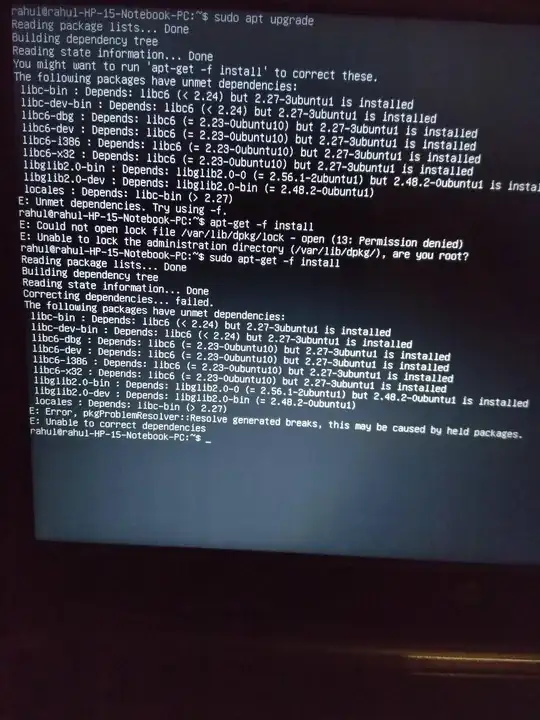
I tried to correct dependencies but it didn't work.
Asked
Active
Viewed 3,042 times
0

RD017
- 856
1 Answers
1
I solved this by logging in via command prompt then entering the command:
sudo ubuntu-drivers autoinstall
This installed the correct NVIDIA GPU drivers and then it worked fine after restart.

abu_bua
- 10,783

John Murray
- 11
sudo apt-get -f install(you didn't have sudo), plus trysudo apt-get dist-upgrade(it doesn't have the restrictions of upgrade). If you still get problems you need to check your sources.list file (https://packages.ubuntu.com/search?keywords=libc-bin & https://packages.ubuntu.com/search?keywords=libc6 as I agree with error messages) – guiverc May 04 '18 at 10:09sudo apt-get -f installas well. Plus,sudo apt-get dist-upgradeis also giving same error – RD017 May 04 '18 at 10:23sources.listfile (maybegrep bionic /etc/apt/sources.list) and expect to see something missing. eg. my own showsdeb http://[redacted-mirror]/ bionic main multiverse universe restricted(you may not have all, but look for 'main' esp., likewise bionic-updates, bionic-security..) – guiverc May 04 '18 at 10:26sources.listfile isn't correct. If yougrep xenial /etc/apt/sources.listyou should get no results, but I bet you do due to errors in your sources.list file (# or commented out lines are okay) the same grep but with bionic (18.04) should get many many lines (my prior comment where I only listed 1 of the many lines you'd see) – guiverc May 04 '18 at 10:46lsb_release -a, andgrep "^deb.*bionic" /etc/apt/sources.listto your question (edit it and add the commands and results there please). To me it still reads as if you have errors in your sources.list file(s). This grep only displays lines beginning in 'deb' followed by 'bionic' (Sorry, as I realize you've said this is your error all along - I can't think of any other cause) – guiverc May 04 '18 at 10:58lsb_release -ais showing that I have bionic installed, but login screen is of xenial. I think I messed up and ended between both. I will go with a fresh install now. Thanks for your efforts :) – RD017 May 04 '18 at 11:11