I want to play videos in iTunes faster (1x, 2x, double speed, etc.) or maybe slower. How do I do that?
Asked
Active
Viewed 3.1e+01k times
45


8 Answers
25
Right click on the file in iTunes and choose "Show in Finder." Then right click the file and open in Quicktime Player. In Quicktime Player you can choose the playback speed by using the A/V Controls (Command + K or Window>A/V Controls). From there, you can select the playback speed:
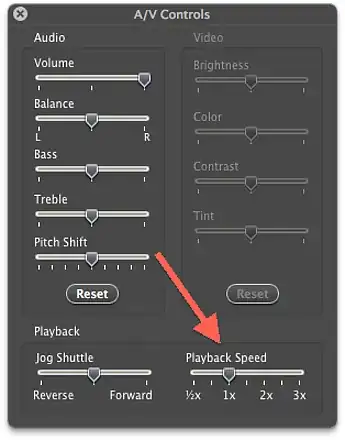
Alternatively, you could use VLC or another music player.

daviesgeek
- 38,901
- 52
- 159
- 203
-
7And yes, it's annoying that you can trivially do this on an iPod/iPhone but not in iTunes. – geekosaur Apr 11 '12 at 00:22
-
-
12The Quicktime solution works with Quicktime 7, which is still available for download, as of 8/2014. It does not work with Quicktime 10. – Aug 16 '14 at 03:18
-
1
-
@ProductionValues Select the track in iTunes, and press Command/Control+I, then under the 'Options' tab, change the media kind from 'Music' to 'Audiobook'. But right now, after iOS update, I am not able to sync audio books anymore. – banterCZ May 10 '15 at 18:52
-
-
5
-
8
The Cmd+K shortcut no longer works in Lion or Mavericks.
Please see a post about increasing the playback speed in Quicktime.
The double arrow allows for integer increases in playback speed.


8
- Right click on the iTunes playlist and click Show in Finder
- Right click on the content in Finder and click Open with Quicktime player.
- While watching the video/movie press Command and then right arrow or left arrow to increase or decrease playback speed, respectively.


-
2This doesn't allow slower, just faster or faster in rewind. 2x is the minimum setting, in either direction. – User May 03 '17 at 21:42
4
Quicktime Player allows you to play the audio faster, but not slower.
The chosen answer, by @daviesgeek, works for Quicktime Player 7 (Snow Leopard or earlier).
If you're on a later version (well, I only tested this on macOS Sierra and Quicktime 10.4), you can play it faster by doing:
- opt + click-on-fast-forward-button. This will increase playback by 0.1x each time.
- opt + right-arrow. This one increases from 1x to 2x to 5x.
You cannot play at a slower speed though (but you can play backwards at speeds greater than 1x).

Rodrigo
- 141
1
Folks, you can download Quicktime Player 7, which is for Snow Leopard or later Mac OS, and works with older media files (as well as current ones, it seems). It has the variable speed functionality you're seeking.
No guarantees this link will work whenever you read this, but it's working now, Nov 2015: https://support.apple.com/kb/DL923?locale=en_US
(Why Apple removed this functionality from Quicktime, who knows.)
Once installed, then play the audio file by first locating it in Finder, and use CMD-click to "open with" Quicktime Player 7. Voila.

DTS
- 11
1
Works for me on Lion or Mavericks:
CMD+OPTION+ (right arrow) for 1,1x
CMD+(right arrow) for 2x


1
You can control the playback speed of an audio / video file in your browser by creating a bookmark with the javascript code found here: https://webapps.stackexchange.com/a/86817/217003
javascript: var v = document.querySelector('video'); var t = prompt('Set the playback rate'); v.playbackRate = parseFloat(t)
I have done this with Safari Version 12.1.1 (14607.2.6.1.1).
I prefer to use Quicktime built into Safari instead of VLC, because slowing down audio / video files in VLC sound harsh.

Option + Lto increase playback speed by +0.1x andOption + Hto decrease playback speed by -0.1x! – Cameron Gagnon Jul 01 '20 at 18:36