You need to rebuild the Launch Services database.
This is easy to do using Onyx (freeware).
Make sure to get the correct version for your current macOS, each is tailored specifically to one OS. Make sure to follow the instructions when installing, as it must be granted Full Disk Access to function properly. It will also need Admin authentication as you launch it.
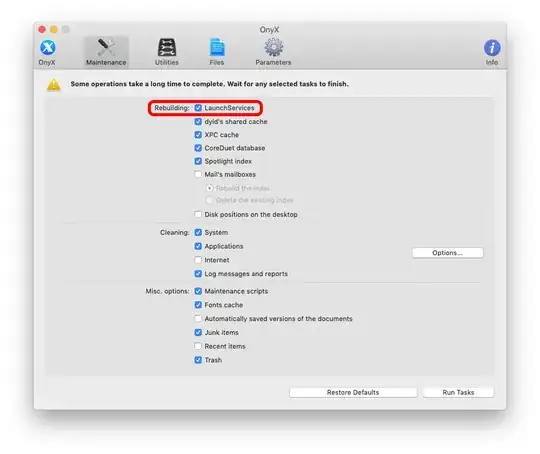
Start at the Maintenance page. It's very powerful & it can do many things.
If you want to get deeper into what it can do, read the Help you can launch from the Help menu.
It won't 'break' anything but if you run everything at defaults it may throw away such as browser history you might prefer to keep.
For the simplest experience, uncheck everything except Launch Services.
It will require full control over the Mac as it's running & you will need to let it quit all apps as it starts, then reboot afterwards.
Pictures below from Mojave. Monterey has different options, but the Launch Services is still there, a little lower down the page.
Before…

Onyx…
After…


