So I installed Ubuntu on an external disk via my MacBook Pro 2016 with a USB flash. Now whenever I try installing another Linux distro such as Pop_OS I see the GRUB loader complaining about a bunch of stuff and I also had to change my booting disk to my macOS Catalina so I understand that GRUB is the main loader rather than the default macOS one. Is there a way for me to completely remove GRUB without having to reinstall macOS?
Asked
Active
Viewed 7,635 times

1 Answers
10
With Ubuntu, GRUB files are stored in the EFI/BOOT and EFI/ubuntu folders in the hidden EFI partition. Apply the following steps to remove the GRUB files.
Enter the following command to determine the identifier for the hidden EFI partition on the external drive.
diskutil listFor this example, I will assume the identifier is
disk2s1. In the following steps, make the appropriate substitutions.To mount the volume stored in the
EFIpartition, enter the following command.sudo diskutil mount disk2s1Note the volume name given in the output of this command. For this example, I will assume the volume name is
EFI. In the following steps, make the appropriate substitutions.Use the Finder application to view the folders in the
EFIfolder of theEFIvolume (device). See image below.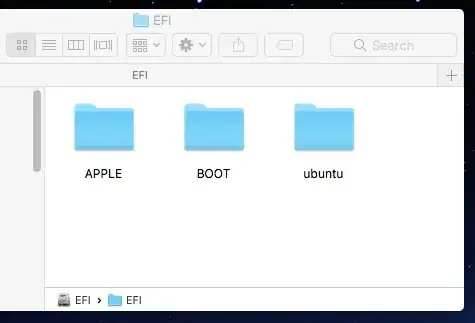
Move the folders
BOOTandubuntuto the trash.Empty the trash.
Enter the following command to unmount the
EFIvolume (device).diskutil unmount disk2s1


David Anderson
- 40,244
-
And this wouldn't affect my macOS installation, correct? I want to be sure that I will be able to boot again without having to reinstall. – Tarek Oct 07 '20 at 20:47
-
1macOS does not use any files stored in this volume to boot. So, this wouldn't affect your macOS installation. – David Anderson Oct 07 '20 at 21:04
-
1Worked fine on my Macbook Air (Intel) – Ashwani Garg Oct 12 '21 at 14:16