Everytime I connect my iPhone to my laptop, Image Capture opens. How to I stop it? I just need to use iTunes, not Image Capture.
Asked
Active
Viewed 2.1k times


3 Answers
68
The preferences you are looking for are located in Image Capture itself.
Here is what to do:


gentmatt
- 49,722
-
8In case some people can't find this option, try clicking the little triangle in a square icon in the bottom left, as it may be hiding the option. – DonnaLea Mar 12 '14 at 23:43
-
There are no devices listed. – User Feb 08 '15 at 02:58
-
In my case I needed to select the device first, otherwise no menu appears – the Reverend Feb 11 '15 at 19:15
-
Wow, is this still the best way to do this? It seems like an "iOS devices" preference pane in System Preferences next to the other hardware pref. panes would be a much more intuitive way to handle this. – Crowder Feb 17 '15 at 17:03
-
Because really, doesn't his answer answers the question, "Where is the one place on my Mac where I control which application opens after my iPhone is connected?"? – Crowder Feb 17 '15 at 17:04
3
You can select Other... and then iTunes from the drop down menu below Connecting this iPhone opens. 

Saaru Lindestøkke
- 5,821

Himanshu A Jadav
- 141
2
Open iTunes/Preferences with your iPhone connected and check:
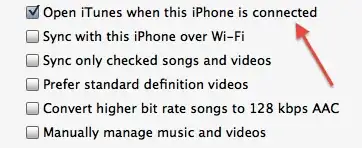
And also check in iPhoto's preferences and select "No Application":


Martin Marconcini
- 21,864
-
now both iTune and Image Capture opens. How can I disable auto open Image Capture? – KMC Nov 28 '11 at 07:42
-
-