47

Currently, Terminal is set to handle SSH urls. For example, if I do:

$ open ssh://machine.example.com

Then it will spawn a new SSH session in terminal. I'd like these to be opened in iTerm2 instead. How do I tell macOS to use iTerm2 to handle ssh:// URLs instead of Terminal?

  • iTerm can so this by default now but if you want to support more advanced functionality show your interest on https://gitlab.com/gnachman/iterm2/issues/5813 ticket. – sorin Jun 26 '18 at 15:46

3 Answers3

62

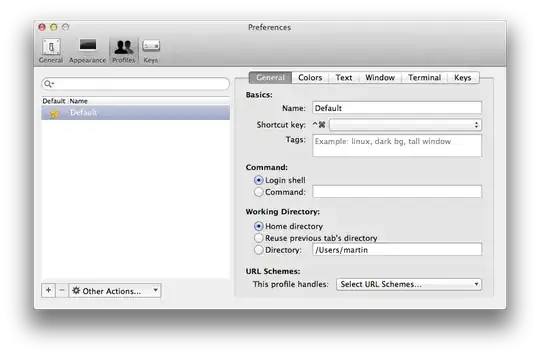
iTerm2 can set itself as the default SSH handler. In its preferences, go to “Profiles”. Create a profile to handle SSH sessions, or select an existing one. In the “General” section, bottom right, you can select which URL scheme this profile should handle:

Screenshot of iTerm2 preferences, General section of Profiles pane

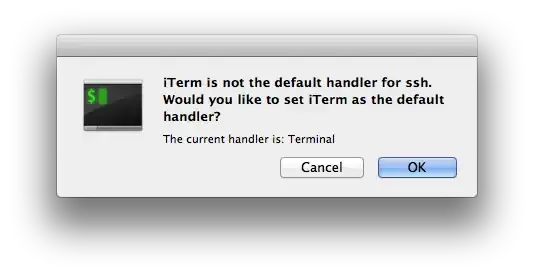
Select SSH. iTerm2 will ask if it is to set itself up as the default SSH handler:

Screenshot of iTerm2 asking for confirmation to set itself up as the default SSH handler

Confirm and you are done. Happy remoting.

kopischke
  • 5,166
  • OK, now I have to figure out how to get iTerm to open a new window instead of a new tab, but that's a separate question... – Lorin Hochstein Oct 23 '11 at 22:07
  • 1
    The interface is still the same but the changes dont ever seem to take effect for me. Should this still be the correct answer or is a bug in the current version (v2.1.4)? – Jeff Oct 20 '15 at 20:43
  • 2
    Similar to @Jeff I experience the change to only take effect for a very short time (if at all). Then Terminal takes over again. – stefanfoulis Feb 19 '16 at 13:56
  • 1
    You also need to set Prefs>Profiles>General>Command to $$. – user2551 Nov 26 '16 at 21:27
  • I had the same problem of @stefanfoulis; this fix worked, which is basically to reset the LaunchServices db: /System/Library/Frameworks/CoreServices.framework/Versions/A/Frameworks/LaunchServices.framework/Versions/A/Support/lsregister -kill -r -all local,system,user – Tommaso Feb 01 '17 at 15:28
0

Make sure you dragged the iTerm2 app in the Applications folder. If you set iTerm2 to be the SSH terminal handler it will not save nor use it. It appears that when you invoke the handler it only looks in Applications. If it doesn't find it there it will default to the system handler. I was running it from Downloads and it would never save the SSH handler. When I moved it to Applications, it open iTerm2 for the SSH handler every time.

  • This doesn't seem to work on El Capitan. I have iTerm under /Applications/ but I have to click on the URL Scheme twice or more to even get the dialog prompt asking to set iTerm as the default, then it works exactly once before reverting to open in Terminal instead. – iandouglas Aug 24 '16 at 20:51
  • @iandouglas I am having the sam issue. Did you figure out a fix? – J Spen Oct 11 '16 at 21:38
  • @j-spen I hadn't tried it recently but just tried $ open ssh://hostname.com here at work and it stayed in iTerm2. Perhaps it's a bug they fixed? I'm on iTerm2 build 3.0.10 on El Capitan and it seems to work okay for me now. I even made an href link on a page to go to "ssh://username@hostname.com" and Chrome prompted me to open the associated app and it went to iTerm 2. – iandouglas Oct 11 '16 at 21:52
0

I use the following method to run a script that opens in iTerm2

open -a "iTerm 2" nonprod.sh

ziggy
  • 101
  • As it’s currently written, your answer is unclear. Please [edit] to add additional details that will help others understand how this addresses the question asked. You can find more information on how to write good answers in the help center. – Community Dec 05 '23 at 17:25
  • How does this help to set iTerm as the handler for ssh:// links? – nohillside Dec 05 '23 at 17:52