4

I'm developing a website and there's a text input in my website's top menu and what bothering me is:

I loaded the site in Safari before my style.css file was edited and after that I edited my style.css and gave a border-radius styling to my text input now I can't make safari show the changes, Of course it is working very well in windows after I pressed ctrl+F5. I want to know the equal of ctrl+F5 in Safari.

Note that I've tried the shortcuts in this link but I still see the old styling of my text input in Safari.

Also I must mention that I use this code in order to make sure that Safari accepts the stylings:

-webkit-border-radius: 10px;
-moz-border-radius: 10px;
border-radius: 10px;
Naser.Sadeghi
  • 237
  • 2
  • 5
  • 17
  • border-radius was unprefixed in June 2010, I very much doubt you're still targeting Safari 5: the prefix is unnecessary. – grg May 22 '17 at 16:31
  • This happens for a simple p tag that has been change after the first time of loading it. – Naser.Sadeghi May 22 '17 at 16:54
  • I'm afraid I'm not sure I understand your comment. All I'm saying is -webkit prefixed CSS for border-radius is unnecessary since June 2010, you have other problems if you're still targeting Safari 4 and previous (6 major versions ago) from prior to June 2010. – grg May 22 '17 at 16:57
  • Beside -webkit I have used simple definition of border-radius too. – Naser.Sadeghi May 22 '17 at 17:02

2 Answers2

3

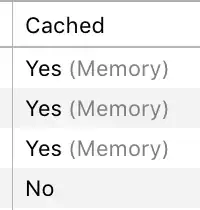
Shift-click the refresh button, or choose View → Reload Page From Origin (⌥⌘R) to refresh ignoring cached resources for the current domain. You can observe the effect in the Web Inspector's Network tab.


What I suspect is catching you out here is how a force refresh only bypasses cache for the same domain as the site you're refreshing. Even with a force refresh, resources may still be cached, such as from CDN domains.


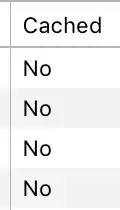
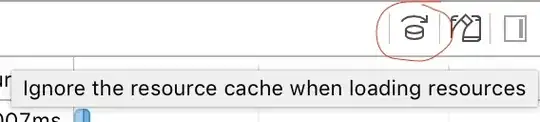
To bypass cache for all resources, open the web inspector, choose the Network tab, then select ‘Ignore the resource cache when loading resources’. Refresh the page normally (all refreshes ignore cache now, not just ⇧-refresh) and all resources will be loaded from origin.


grg
  • 201,078
1

After Searching a lot, I found that border radius is not supported in Safari for inputs of type "search". Therefore I changed my search form's text input from "search" to "text" and now it works perfectly.

Naser.Sadeghi
  • 237
  • 2
  • 5
  • 17