In Snow Leopard alt-3 used to print a #, in Lion it doesn't. I'v tried different key combination keyboard viewer but still no luck. Any ideas were the # key went?
Asked
Active
Viewed 3,165 times
2

5 Answers
8
Since it varies by keyboard layout - why not open your keyboard viewer and find out?
In the US keyboard layout on lion, it's still shift + 3
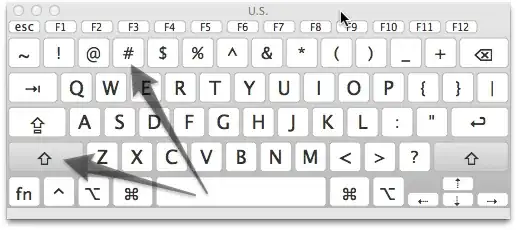
You have to select this from the menu bar after enabling it in the menu bar


bmike
- 235,889
-
The post author did mention trying keyboard viewer. But perhaps did not hit shift or alt+shift? – Tom Gewecke Aug 11 '11 at 14:34
-
2
It's still Alt-3 on my UK keyboard -- ###.

Mike Scott
- 10,484
-
2apparently uk keyboard has alt-3 as # & shift 3 as £; the U.S. keyboard is vice versa – Samantha Catania Aug 11 '11 at 14:43
-
1
I like to use the widget:
CharacterPal
Searching and copying a needed character is faster than with the keyboard viewer:
- You do can look through all characers at once. With the keyboard viewer you need to hold ⌥ and ⇧ to see more characters.
- Characters are sorteded by type: greek, keyboard, math...
- TOP: You can find special (keyboard) symbols like ⌦, ⌘, ⎋, ⏏, ⌤ ...


-2
You're talking about the hash key? Doesn't it print when you press Shift+3 ? Or maybe your keyboard layout is different but on every keyboard I've seen in the United States that's where the hash key lives.

bringel
- 780
-
1Perhaps the questioner isn't in the United States? Apple keyboards in the UK have no hash symbol marked on them at all, but you can get hash with Alt-3 (in Lion as well as Snow Leopard). Similarly, the Euro symbol € is Alt-2, which is marked on the keyboard, and Alt-1 and Alt-4 through Alt-0 also produce different unmarked characters. – Mike Scott Aug 11 '11 at 14:25
-
¡™£¢∞§¶•ªº–≠ alt is fun ⁄€‹›fifl‡°·‚—± how much comes out when non-Macs view this web page? – GEdgar Aug 11 '11 at 15:33
-
Alt+3... – Michal M Aug 11 '11 at 14:40