2

How can I see some or all of the individual word differences between the built-in dictionaries. I'm curious and inspired by this question where the UK typically adds the suffix -ise and USA typically spells it -ize.

It would be nice to to see the differences between these variants from the list of languages/dictionaries available in Mac OS X.

  • Australian English
  • British English
  • Canadian English
  • U.S. English

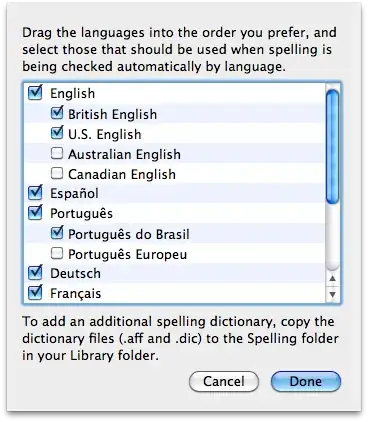
In originally asking this question, I thought that the spelling was controlled by the Language tab in the Language & Text preference pane, but have since learned that there is a Spelling option under the Text tab of the same preference pane (is that new in Snow Leopard?). From here it appears that other dictionaries can be easily imported (in aff or dic file format) which would lead me to believe that the spelling dictionaries are a standard format that may be read by other tools. However, the /Library/Spelling folder doesn't have any files.

Text tab showing spelling option

Spelling setup panel showing language variants

As a bonus, it would be great to know how the language variants under the Language tab are used and why the variants there don't match up to the spelling dictionary.

Language tab showing variants of English, French, Spanish, and Portugeuse

g .
  • 3,308
  • I'm voting to close because I feel this question would be better on [english.se] (for the difference between type of english part, and the answer will probably be the same for the other languages). – Loïc Wolff Aug 11 '11 at 11:28
  • 3
    The question isn't about the language itself, but the dictionaries in Mac OS X. For example, why would I want to use 'English' as opposed to 'US English'? Is there a way I an rephrase to make this clearer? – g . Aug 11 '11 at 11:31
  • Also, this answer (http://apple.stackexchange.com/questions/21429/uk-spelling-dictionary-teach-os-x-all-ize-spellings/21439#21439) indicates that the OS X dictionary doesn't appear to be consistent with the 'language' itself which further supports the need to identify the difference as defined in OS X. – g . Aug 11 '11 at 11:34
  • The question is a confused. There are only 4, not 5 English spell checking dictionaries: US, British, Canadian, Australian. There are 2 for Portuguese. There are NO variants for French, German, or Spanish. So what is the poster referring to? Keyboard layouts? Formats? Items in the Languages pane? In every case the answer would be different. – Tom Gewecke Aug 11 '11 at 12:01
  • I think the OP hopes to dump the respective word lists into text or XML/JSON and run it through a diff program, but it isn't yet clear if this is the intent. – bmike Aug 11 '11 at 13:37
  • @Tom Gewecke - My understanding is that the dictionaries used are based on the selected languages from System Preferences. Is that not the case? – g . Aug 12 '11 at 09:57
  • @bmike - That's a bit techy, but would work. Any way to see the differences would be fine -- even documentation from Apple. – g . Aug 12 '11 at 09:59
  • I took a stab at cleaning this up - embedding the many comments. I also tried to make the question clearer and use English as a reason to understand the core question - not the core question. – bmike Aug 12 '11 at 14:18
  • @g The default spell checking dictionary can be determined sometimes by the language at the top of the list, but there is otherwise no connection between that list and the dictionaries. You can see a list of the actual dictionaries available in language & text/text/spelling. More can be added by grabbing from the OpenOffice stuff. http://m10lmac.blogspot.com/2011/06/extra-spell-checking-dictionaries-for.html – Tom Gewecke Aug 12 '11 at 14:55
  • @g You might find it easier to use the OpenOffice dictionaries instead of the Apple stuff, as the files are easier to find and also there is presumably documentation somewhere in that project. – Tom Gewecke Aug 12 '11 at 16:58
  • @Tom Gewecke - I can't believe I've overlooked all this time. Good to know! – g . Aug 12 '11 at 17:08
  • @Tom Gewecke - I've updated the question to focus more on the spelling dictionaries. It appears you a bit about the spelling and language options; it would be helpful if you put your comments together in an answer explaining it. – g . Sep 04 '11 at 08:17

2 Answers2

1

Many people have tried to find the files for Apple's spell check dictionaries but I don't recall any successes.

As for the Language tab in Language & Text, it really doesn't have anything to do with spelling as such, although the top item on the list can set the default spell check dictionary in some circumstances. The top item on the list also sets the OS and app language (for the 22 that are available), the default collation order, and the preferred language requested by Safari. The order of the list can determine the app language used if a localization for the top item is not available. The order can also determine whether a Japanese or Chinese font is used for text which is ambiguous in that regard. I think adding an item to the list can sometimes provide additional encodings in Mail app.

Tom Gewecke
  • 20,864
0

I presume the other languages follow the example of the English ones, and provide for localised variations in spelling and grammar. Look up "colour" and "color" for example, or words ending in "ise" rather than "ize" and so on.

Not aware of a way of checking differences, but can't really see why you would need to - if required add multiple choices from the languages and text preference pane as input sources, then ensure the input choice is put in your menu bar for quick selection of them. Then go play in dictionary in the dashboard.

stuffe
  • 25,668
  • As an American living in England, I understand the differences between US and British English (e.g. -our and -ise). What isn't clear, is what the differences are as defined by these dictionaries. As seen from this question (http://apple.stackexchange.com/questions/21429/uk-spelling-dictionary-teach-os-x-all-ize-spellings/21439#21439) it would be helpful to have some visibility as to the differences. – g . Aug 11 '11 at 11:48