46

Recently I have been getting a few unwanted telemarketing calls, all coming from the same source. Each number though is different at the end.

For instance, if the numbers to be blocked are:

  • 123-4567
  • 123-7642
  • 123-8643

It would be convenient for the future to simply block with a wildcard, such as:

  • 123-*

Is this at all possible?

bmike
  • 235,889
Geoff
  • 749
  • 3
  • 8
  • 15

9 Answers9

10

WideProtect is a pretty simple app for exactly this purpose https://itunes.apple.com/app/wideprotect/id1171024059

It allows for specifying a wildcard pattern to block numbers, like 609-***-****. At the minimum it requires the first three digits so you should be able to block entire states with this.

  • FYI: It can't help you to block a whole country and it has limits on the total number of entries blocked. When you enter a range, the app blocks every single number in that range adding an entry to the iOS black-list – Ed Gomoliako Feb 05 '21 at 12:25
7

I've developed an app called Number Shield ($2.99) that blocks calls by allowing you to enter a wildcard for certain digits in the phone number. It's available here:

https://itunes.apple.com/us/app/number-shield/id1319082167?ls=1&mt=8

It has a limit of 7 wildcards per number pattern and a total of 50,000,000 numbers blocked. These restrictions are due to limitations in the way the iPhone's call blocking system works.

(Yes, this is a bit of shameless self-promotion, but it certainly answers the question.)

  • Thank you, self promotion is encouraged here with disclosure of your relationship to the product. If you want, indicating how your app is funded might make people even more willing to trust it on their phone. – bmike Jan 27 '19 at 18:40
  • 2
    $1's cheap, but hoping this works. I'd pay $20 if I could know that it'd work right beforehand. Also, I truly want to screw the people who do robocalls... have you considered an app that would let me set up my own robot, to waste as much of their time as possible? I've got unlimited minutes, but they don't. Let it record my voice, and then use speech recognition to try to keep them on the phone as long as possible. Done right, it might bankrupt these shitbags. – John O Sep 13 '21 at 15:36
  • 1
    No, I don't have plans to develop anything like that, but you might want to check out the Jolly Roger Telephone Company, which does pretty much this exact thing. – Alan Kinnaman Sep 17 '21 at 03:28
  • I just bought it, and if it doesn't work, I'm coming for you – Tolga Ozses Oct 22 '22 at 09:00
5

There is now an API for applications to block and annotate incoming calls. There isn't a native interface. So, you would need to find an app that does this on the App Store. Or, find an open source project, compile it in Xcode and use your AppleID to install the app onto your personal devices.

One review covering this category is:

The major US carriers are also starting to identify spoofed caller ID. So, you would want to check with your cellular carrier to tighten up which calls and information they send in the first place to the iPhone. Once you’re set there, look at a call screening app that meets your specific needs. The good ones cost money to develop. So, if you are running a free app or don’t understand how they pay their bills, double check if they instead sell your call or location data to fund the app.

bmike
  • 235,889
2

Try Blacklist and Blacklist Pro by Sergey Smirnov, and Ad & Call Blocker 2 in 1 by Codefavor. Blacklist (free) allows one range of numbers. Blacklist Pro ($1.99) allows multiple ranges of numbers. Ad & Call Blocker 2 in 1 is 1.99.

2

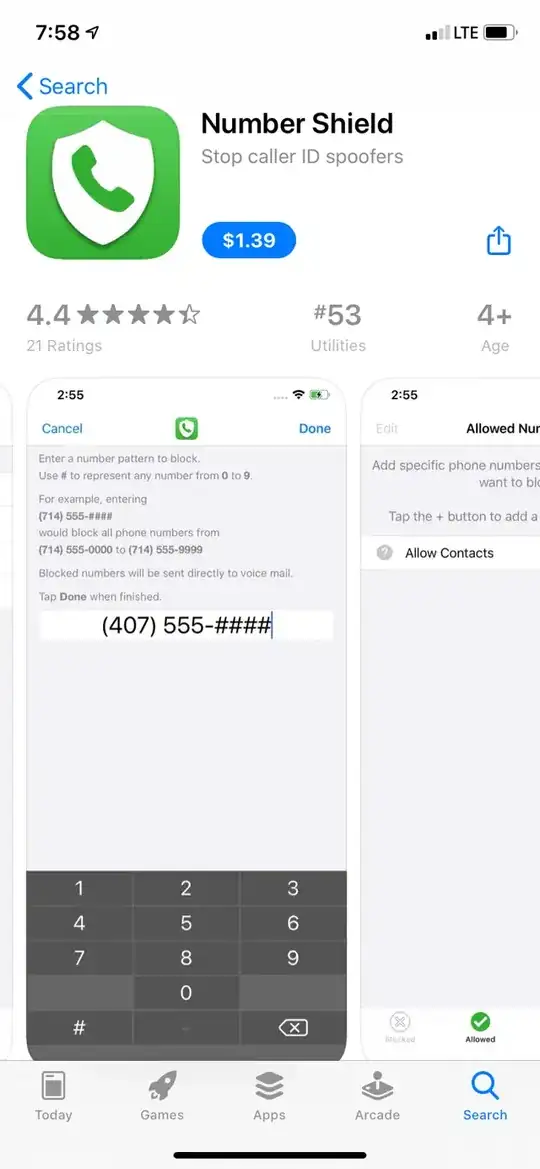
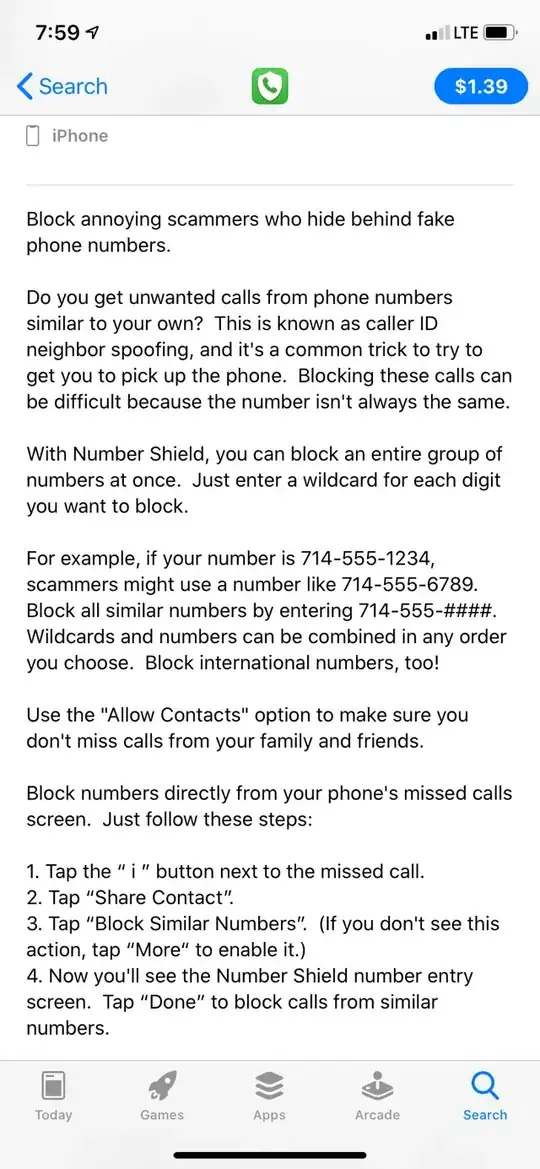
This app claims to do just that. I am about to try it but figured I'd share what I found. https://apps.apple.com/ca/app/number-shield/id1319082167

Screenshot 1 from Apple App Store

Screenshot 2 from Apple App Store

enter image description here

fsb
  • 22,799
Josh S
  • 21
1

Yes, that is possible with Call Protect (NOT AT&T Call Protect) app’s range-blocking feature. This app is available here for FREE: https://itunes.apple.com/us/app/call-protect/id1357820531?mt=8.

So, how to block a range of numbers using Call Protect? Launch the app > Go to Block tab > Tap on Block a Number button > Select Block a Range of Numbers option > Enter the starting and ending numbers of the range.

Please note that you have an option to whitelist the numbers from your contacts, so the numbers in your contacts do not get blocked. I have found this app pretty useful so far and recommend it to you.

0

For ios, to block all numbers .... 123-456-7891

  1. To block all numbers beginning with 123-456, A) Make new contact with number entered as 123-456-**** B) block that contact

  2. To block all numbers beginning 123-45, A) make contact and block wih number entered as 123-45*-**** Do you see pattern?

Al nov
  • 9
  • 1
-1

Begone is free and works for this: https://apps.apple.com/us/app/begone-call-blocker/id1596818195

Alex
  • 9,600
  • Would be nice if you mentioned where it was available from with a link and briefly described how it worked with any peculiarities. – Alper Feb 03 '23 at 20:40
-2

CALL Protect is a free application by ATT for ATT users. This app works great for reported numbers but does not protect against “wildcard” bot calls that switch the last four digits of your own exchange. There are several other apps that work for this listed on this page.

Help
  • 1
  • 2
    AT&T Call Protect does not allow wildcards to define ranges of numbers to block. – JGG Jun 20 '18 at 21:16