Is it possible to configure finder in Mavericks to open new tab (by clicking plus sign or cmd+t) in the same directory by default?
Asked
Active
Viewed 2.3k times

9 Answers
66
Press Command ⌘Control ^O in Finder without having anything selected (otherwise you will open-tab to the selection if it's a folder instead).
Pressing simultaneously Command ⌘Control ^O will open a new tab in the same folder as the currently opened folder.
No need for any extra things in OS X for this ;-)


26
There is another way to accomplish opening a new tab in the same location, if you don't absolutely need to have it as standard.
Open a Finder window and make sure that the Path bar is shown either by going to View -> Show Path Bar or by pressing ⌥⌘P. You then get the folder hierarchy in a bar at the bottom of the window. Just hold ⌘ and double click any item in that bar to open that folder in a new tab (or new window if not using tabs).


Lizzan
- 9,128
-
Nice ! I knew there should've been something with the path bar! How do you disable tabs so that you get a new window? – Ciprian Tomoiagă Aug 29 '19 at 16:08
-
1@CiprianTomoiagă Open Finder preferences, go to the General (leftmost) tab and uncheck "Open folders in tabs instead of new windows" – Lizzan Aug 30 '19 at 05:36
8
Another similar approach to the one described by Lizzan but which doesn't need the path bar to be visible is to Cmd-click on the current folder in the title bar of your Finder window. This drops down a list of the hierarchical path to the current folder - so the 2nd entry in the list (after the current folder itself) is the parent of the current folder. If you cmd-click on the parent folder it will open in a new tab. To minimise the clicks required if you cmd-click and hold the cmd-click down then when you release it on the parent folder it will open in a new tab.
This approach is very useful if the folder you want in the new tab is actually a sibling of the current folder in the path hierarchy.

colinf
- 181
5
In Monterey and later versions of MacOS:
press the Command key while you double-click the folder. The folder opens in a new tab or window, depending on your Finder preferences.

2
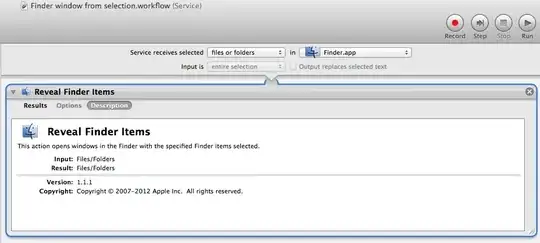
It's possible to create a automator action and turn it to a service, which you can assign a keyboard shortcut too.
Open automator > select create new service > where it says "service receives selected" choose [files or folder] > where it says "in" choose [Finder.app]
Then find the automator action "reveal finder items" and drag it in. That's it. Save it as a service and then go to keyboard prefs and assign it something like ⌃⌘O. Now when you have a folder selected in finder and do that shortcut it will open a new tap to that location.
It's not perfect. I think I like the Command click title and then command click folder technique better but I thought I'd put it out there.
Please write to apple in their feedback page requesting an official finder preference for "new Finder tabs show:" [last opened directory] or [current directory] Maybe they will include in 10.10.

greg
- 37
- 1
1
No, there's no option to do this. The new tab uses the following setting from Finder preferences. There's no option to use the current location or a different location for tabs.


grg
- 201,078
1
There's a Finder add-on/replacement called TotalFinder, which has (among other finder tweaks) an option to open new tabs with the location of the last active tab/window.
It's commercial software ($18USD at the time of writing) so probably only worth it if you also want its other features & tweaks.

drfrogsplat
- 8,610
-
Totalfinder is buggy. Also can not see this functionality requested is in it regardless. – mjs May 13 '23 at 17:38
1
Add this to complex modifications in Karabiner.
Basically it will simulate go up once, go down once, then cmd + ctrl + o. The first two to make sure nothing is selected.
It is a bit slow though because we have to wait until we believe the new window / tab is done opening.
    {
        "conditions": [
            {
                "bundle_identifiers": [
                    "^com.apple.finder"
                ],
                "type": "frontmost_application_if"
            }
        ],
        "from": {
            "key_code": "t",
            "modifiers": {
                "mandatory": [
                    "left_command"
                ]
            }
        },
        "to": [
            {
                "key_code": "up_arrow",
                "modifiers": [
                    "right_command",
                    "right_control"
                ]
            }
        ],
    "parameters": {
        "basic.to_delayed_action_delay_milliseconds": 500 // 300 is fine for desktop, but laptop balls out on 300. Too slow.
    },

    "to_delayed_action": {
        "to_if_invoked": [
            {
                // We default to the command 2 list view because otherwise it will break
                "key_code": "2",
                "modifiers": [
                    "right_command"
                ]
            },
            {
                "key_code": "o",
                "modifiers": [
                    "right_command"
                ]
            }
        ]
    },
    "type": "basic"
}

mjs
- 258
-
1Just found another way to deselect: perform shortcut
Command + Option + A. ThenCommand + Ctrl + O. Using this inBetterTouchTool, working well! – AnthoPak Feb 09 '20 at 18:24 -
-
Command + Option + A no longer works in Monterey. Will deselect all. And not open anything after. left_command + left_control + o has different behaviour now. It will open something in a new tab, but only if the mouse is on a directory. So now, i open in new tab then go up to go to the parent directory. However, if a file is selected this won't work right now. – mjs Apr 18 '22 at 20:23
-
-
-
0
In Monterey the Finder window pull-down menu (circle with 3 dots) has an "Open in New Tab" command. I assigned that a keyboard shortcut, ^⌥⌘T, problem solved!

Michael Rogers
- 101
-
That menu option seems to open a selected folder in the current folder, not the current folder itself as asked in the question. – Alper Sep 10 '22 at 14:49
-
Right, if you select a folder. But when you open a folder nothing's selected, and if you've selected a folder just click somewhere else in the window to unselect it. This works in both list and icon views, those are the only 2 I use. – Michael Rogers Sep 11 '22 at 15:10
-
Thx. I have Monterey v12.5.1 installed on my Mac but I don't see an "Open in New Tab" option in the drop-down menu that appears when I click on the "circle with 3 dots" icon at the top right of a Finder window, even when no file or folder is selected. I see an "Open in New Window" option in that drop-down menu when only a folder is selected. Does one need to make any setting changes in somewhere in System Preferences for such an option to appear? – Alper Sep 11 '22 at 15:46
-
Doesn't work for me in Ventura 13.1. If you use this while no folder is selected, nothing happens. It does open in new tab when a folder is selected. – user2905146 Dec 31 '22 at 23:30
-
What is the shortcut for if i have to mouse click in some cases? Apple should get their shit together. – mjs May 13 '23 at 17:31
Command + Option + A. ThenCommand + Ctrl + O. Using this combination in BetterTouchTool, working well! – AnthoPak Feb 09 '20 at 18:25Command + Up arrowand thenCommand + Ctrl + Owill give you a new tab like the one you had, but you will need to pressCommand + Down arrowin the original tab to get it back to where you were. – Nagel Nov 10 '22 at 09:50