When using Terminal, I sometimes get the following appearing.
Last login: Fri Dec 27 22:04:56 on ttys002
ޕ:~ agrimm$ cd ruby
ޕ:ruby agrimm$ cd ..
ޕ:~ agrimm$ cd ruby/
ޕ:ruby agrimm$ pwd
/Users/agrimm/ruby
ޕ:ruby agrimm$
With the following screenshot (in which it can be seen that the order of text isn't correct)
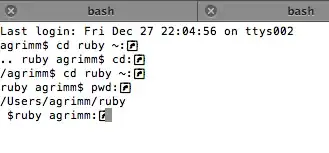
I'm using "Default login shell" in my Terminal settings.
The files mentioned in this answer seem normal. /etc/profile seems normal. ~/.bash_profile seems normal apart from rbenv, homebrew, and Java stuff:
# Commented out lines not included
if which rbenv > /dev/null; then eval "$(rbenv init -)"; fi
export PATH=$PATH:/opt/local/bin
export JAVA_HOME=`/usr/libexec/java_home -v 1.6 -a x86_64`
~/.bash_login doesn't exist
~/.profile seems fairly normal:
# MacPorts Installer addition on 2009-12-30_at_14:40:02: adding an appropriate PATH variable for use with MacPorts.
export PATH=/opt/local/bin:/opt/local/sbin:$PATH
# Finished adapting your PATH environment variable for use with MacPorts.
I'm using Snow Leopard. uname -a gives the following:
Darwin ޕ 10.8.0 Darwin Kernel Version 10.8.0: Tue Jun 7 16:33:36 PDT 2011; root:xnu-1504.15.3~1/RELEASE_I386 i386
The problem seems to occasionally appear and disappear.
How do I fix the strange characters and the order of text being wrong?


