I'm using Chrome 32 on an Android tablet (not phone) and just can't figure out how to close all open tabs in one go.
Asked
Active
Viewed 2.2k times
7


-
Here's a more-thorough answer, with more screenshots. Be sure to click the number of tabs icon first or else the Close All Tabs option won't exist. Clicking the number of open tabs icon first forces the 3 dots menu to have different content. – Gabriel Staples Jan 04 '21 at 16:38
3 Answers
7
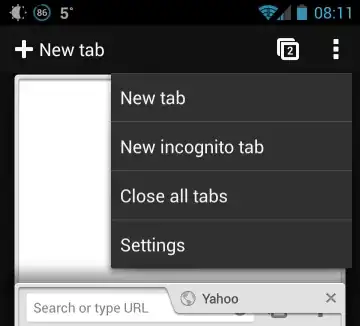
- Click on Tabs icon in upper right corner
- Go to options
- Click on close all tabs

ale
- 19,723
- 34
- 110
- 159

khanburhan
- 71
- 2
-
1Unfortunately your answer does not work on tablets. There is no such menu option visible in Chrome 32 on an Android tablet. – Christopher Jan 30 '14 at 20:07
3
According to this Google Support page, you can't.
You have to close tabs individually, at least on a tablet.
ale
- 19,723
- 34
- 110
- 159
0
I went to Android's settings, then to apps, then to Chrome, and cleared the data and the cache. When I reopened Chrome, the tabs were all closed. This was done on a Asus Memo 7 tablet. I know it's combersome, but it beats manually closing 100+ tabs.

jumpnett
- 438
- 1
- 6
- 12